7 Mistakes With CTR Manipulation Tools and Automated Sessions
You set up an automated session, and it reports a visit. But can you prove the page actually loaded? Without evidence, you are paying for activity you cannot verify, and Google's rankings will not confirm it either.
This article walks through seven common mistakes with CTR manipulation tools, from running sessions without screenshot proof to misreading credit costs across plans. By the end, you will know how to check keyword eligibility, match device and location settings, and decide whether CTRTool's screenshot-based model fits your campaigns.
What Is CTRTool? Campaign Types, Proof Model and Who It Serves
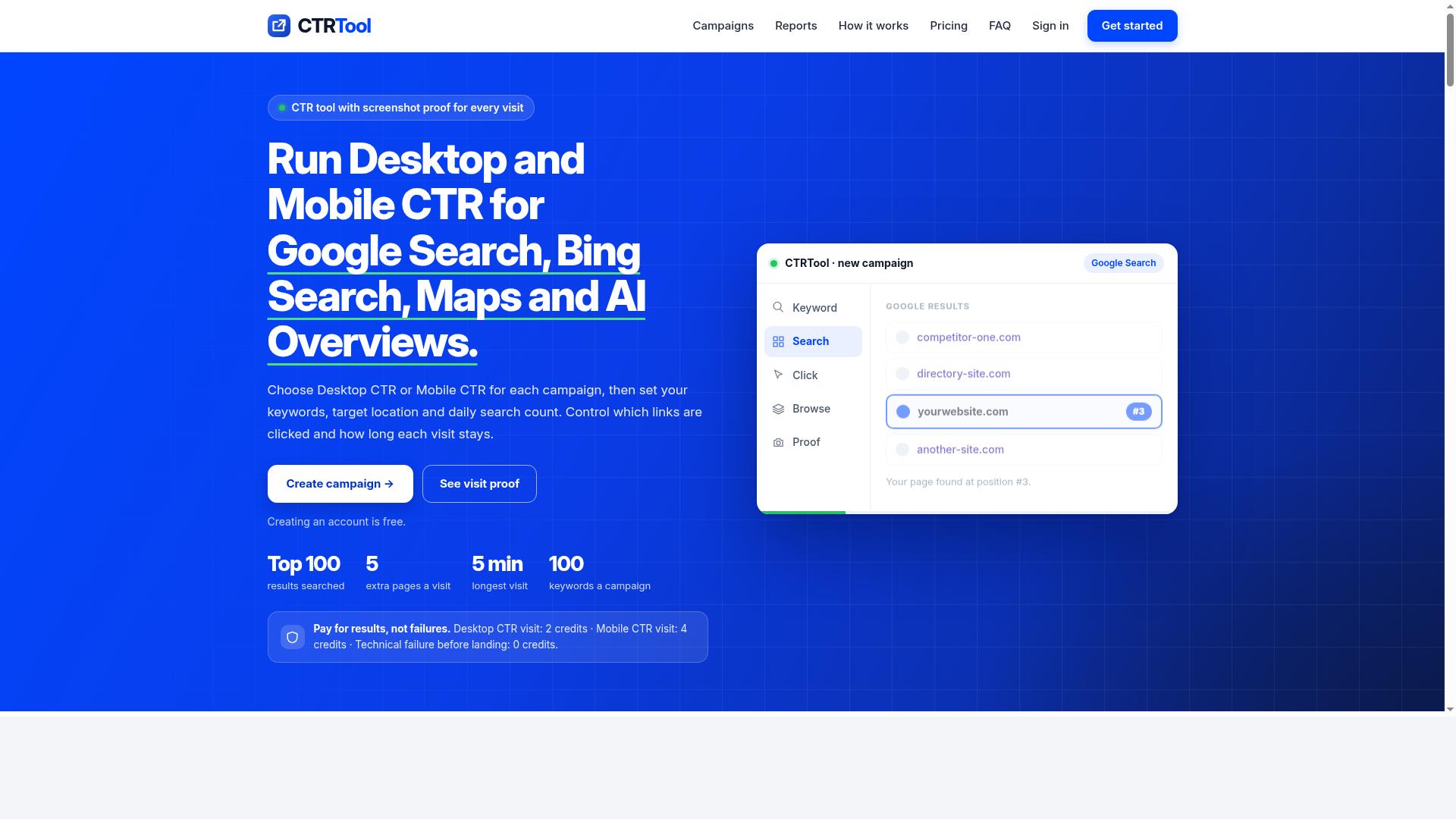
CTRTool is a CTR campaign platform that runs Desktop and Mobile click-through-rate campaigns for Google Search, Bing Search, Google Maps and AI Overviews, with screenshot proof for every visit. In plain terms, it is software for running structured, automated sessions against chosen keywords and locations rather than leaving click-through rate to chance.
The platform covers four campaign types, and each one lets the user pick Desktop or Mobile before launch:
- Google Search CTR for standard organic results
- Bing Search CTR for Microsoft's search engine
- Google Maps CTR for local and map-based visibility
- AI Overviews for AI-generated answer placements
Within a campaign, users set keywords, target location and daily search count. They also control which links are clicked and how long each visit stays, which is the part that shapes session duration and dwell time rather than raw clicks alone.
The proof model is where CTRTool separates itself from vague claims. Every visit produces separate search and landing screenshots, plus the full visit path, so an agency can show a client exactly what happened rather than asking them to trust a dashboard number.
CTRTool serves SEO practitioners and agencies running campaigns for their own sites or for client properties. It is built for people who already understand SERP visibility and want a repeatable process. The site is also direct about limits, stating that automated visits do not guarantee rankings, which sets honest expectations before any campaign begins.
Do These 7 Mistakes Mean CTR Tools Are Unsafe? CTRTool's Verdict
The seven mistakes outlined here are operational failures, not inherent flaws of CTR tools - and CTRTool's design choices directly address each one.
None of the errors below stem from the technology itself. They come from running automated sessions without proof, eligibility checks, or oversight. CTRTool counters them with screenshot proof for every visit, position tracking, and device and location controls, all managed through structured campaigns.
The verdict is clear: the tool is not the risk. Undisciplined use is. CTRTool is built as a CTR tool for Google Search, Bing Search, Maps and AI Overviews, and its guidance to start with tier links, PBNs and test properties reflects a cautious, controlled approach rather than reckless volume.
What follows is the mistake-by-mistake breakdown, so you can see exactly where campaigns go wrong and how each failure is avoidable.
Mistake 1: Running Automated Sessions Without Screenshot Proof
Running automated sessions without verifiable proof leaves you unable to distinguish real visits from bot traffic or click fraud. A logged click count tells you an automation script fired, not that a result was actually seen or a page actually loaded.
Without screenshots, you cannot confirm that a click landed on the search result or the landing page, so you may be paying for phantom sessions. Proxy rotation and IP diversity alone do not prove a visit occurred. They only show that different addresses were used, which is a very different claim from a verified visit.
This gap matters most when you are reviewing spend across many keywords. A session that never rendered the SERP or never reached the destination page still consumes budget and skews your view of CTR manipulation tools performance.
How CTRTool's Search and Landing Screenshots Close This Gap
CTRTool captures two separate proof images per visit, a search screenshot and a landing screenshot, so every click is auditable. These images are stored per visit and can be reviewed later to verify session authenticity.
The search screenshot confirms the keyword, the SERP position, and the device view at the moment of the visit. The landing screenshot confirms the final URL that was reached. Together they answer the two questions that matter: was the result seen, and was the page loaded.
This is a meaningful contrast with tools that only log a click count. A count is a claim. A pair of stored screenshots is evidence you can open, compare, and archive. For agencies, that proof also helps demonstrate value to clients, because session authenticity can be shown rather than asserted.
The proof model fits the wider CTRTool credit structure. Credits are only charged for results, with no credits charged for technical failures before landing, and visits that cannot verify the requested location use no credits. One credit balance is shared across all campaign types, websites, and keywords, so the same auditable standard applies wherever you run automated sessions.
Mistake 2: Ignoring Keyword Position and Eligibility Rules
Ignoring eligibility rules, such as the top 100 organic results requirement, causes campaigns to fail silently or waste credits on keywords that cannot be served. Every campaign type in CTRTool has clear prerequisites, and a keyword that looks promising on paper may be rejected before a single automated session runs.
This is one of the quieter mistakes with CTR manipulation tools because nothing dramatic happens. The campaign simply does not deliver the expected click-through rate activity, and the user assumes the tool is at fault rather than the setup.
The fix is straightforward: check where the target page actually sits before committing credits. The next section breaks down each rule with the exact thresholds CTRTool applies.
Top 100 Results, Maps Listings and AI Overview Source Links
CTRTool enforces three distinct eligibility checks: top 100 organic results for Search campaigns, up to 50 Maps listings for Maps campaigns, and a matching source link for AI Overview campaigns. These are hard requirements, not suggestions, and each one reflects how the underlying platform serves results.
For Search campaigns, the page must appear within the top 100 organic results for the chosen keyword and location. If the page ranks beyond that window, the campaign cannot be served for that keyword. Checking the position first avoids spending credits on a target the system will not accept.
Maps campaigns work differently. CTRTool checks up to 50 listings, which covers roughly five pages of map results. A business that falls outside that range is not eligible for a Maps campaign on that keyword.
AI Overview campaigns carry their own condition: the page needs a matching source link. Without that citation, the campaign has nothing to attach to and cannot proceed.
A quick pre-launch check makes all of this manageable:
- Confirm the page ranks within the top 100 for the keyword and location before starting a Search campaign.
- Verify the listing appears within the first 50 Maps results for Maps campaigns.
- Confirm the source link match before running an AI Overview campaign.
Verifying eligibility before launch protects the credit balance and keeps expectations realistic. CTRTool is also clear that it does not guarantee higher rankings, leads or sales, so treating eligibility as the first checkpoint is part of running an honest SEO strategy rather than chasing ranking manipulation shortcuts.
Mistake 3: Mismatching Device, Location and Daily Search Volume
Sending desktop clicks to a mobile-first keyword, or targeting a city with no search demand, creates unnatural patterns that undermine the campaign. Behavioral signals only look credible when they mirror how real people actually reach a page.
Device type matters because search distribution is rarely split evenly. If most real visitors find a keyword on a phone, a stream of desktop-only sessions stands out. Match the device mix to the keyword's known pattern rather than defaulting to one setup.
Location targeting deserves the same care. Country, state, and city settings should reflect genuine demand, not convenience. CTRTool supports a chosen country with an optional state and city, or Any country to use a mix of supported locations. Choosing the mix option when you meant a single market, or the reverse, can scatter sessions in ways that look off.
Volume caps matter too. Pacing clicks within a plausible range keeps a campaign from looking mechanical. CTRTool's per-campaign device and location settings make it easier to keep each session aligned with the keyword it targets.
Mistake 4: Uncontrolled Click Behavior and Visit Duration
Clicks that arrive in bursts with identical dwell times and instant bounces create a fingerprint that is easy for Google's algorithm to flag. Real visitors behave unevenly. They linger, scroll, click around, and sometimes leave quickly. Automated sessions that ignore this variation stand out fast.
Three patterns are the usual giveaways:
- Uniform session durations where every visit lasts the same number of seconds
- Zero scroll depth where nobody ever moves past the fold
- 100% bounce rates where every visitor returns to the SERP immediately, a pattern known as pogo-sticking
To fix this, vary visit duration across a realistic range and simulate scrolling plus internal page visits. This builds believable session duration and user engagement signals instead of robotic uniformity.
CTRTool supports internal page visits within campaigns, with up to five additional pages per visit and visits up to five minutes total. That lets a campaign build realistic session paths rather than single-page bounces, helping organic click patterns look more natural in the reports.
Mistake 5: Skipping Keyword and Citation Tracking Over Time
Without longitudinal tracking, you cannot tell whether a CTR campaign improved rankings or whether a temporary spike masked a decline. A single day of movement proves nothing on its own.
Ranking movement should be measured before, during, and after each campaign. This means capturing baselines first, watching positions shift during the active window, and confirming the change holds once sessions stop.
Track keyword positions daily, and monitor Maps listing order and AI citation order as separate signals. A keyword can climb in classic results while its Maps placement slides, and AI citation order often moves on a different rhythm entirely.
CTRTool supports this by tracking keyword positions over time, including Maps listing order and AI citation order. That gives you a timeline to base decisions on rather than a snapshot.
The core warning is simple: never judge success on a single day's data. Look for a consistent pattern across the full measurement window before drawing conclusions.
Mistake 6: Overpaying or Misreading Credit Costs Across Plans
Misunderstanding how credits translate to Desktop versus Mobile visits leads to budget overruns or unused capacity. The credit system is not one-size-fits-all, and assuming a single plan covers every campaign type can quietly drain a monthly budget.
Every CTRTool plan is priced in credits, but a credit does not always buy the same thing. A Desktop CTR visit costs 2 credits, while a Mobile CTR visit costs 4 credits. That 2:1 ratio means the same plan delivers very different visit counts depending on the device mix you target.
Two other credit rules matter for budgeting. A verified search without a match costs 1 credit, and a technical failure before landing costs 0 credits. Reading those rules before choosing a tier prevents surprise shortfalls mid-campaign.
CTRTool Pricing: Starter $59, Growth $125, Scale $399 per Month
CTRTool offers three monthly plans: Starter at $59 for 2,000 credits (up to 1,000 Desktop or 500 Mobile visits), Growth at $125 for 5,000 credits (up to 2,500 Desktop or 1,250 Mobile visits), and Scale at $399 for 20,000 credits (up to 10,000 Desktop or 5,000 Mobile visits). An Agency tier at $699 for 40,000 credits (up to 20,000 Desktop or 10,000 Mobile visits) covers larger operations.
Growth is marked Recommended, which suits most mid-sized campaigns. The table below shows how each tier converts under the credit ratio.
| Plan | Monthly Price | Credits | Desktop Visits | Mobile Visits |
|---|---|---|---|---|
| Starter | $59 | 2,000 | 1,000 | 500 |
| Growth | $125 | 5,000 | 2,500 | 1,250 |
| Scale | $399 | 20,000 | 10,000 | 5,000 |
| Agency | $699 | 40,000 | 20,000 | 10,000 |
To avoid overpaying, calculate your monthly visit needs first, split by device, then choose the smallest plan that covers them. Running mostly Mobile sessions doubles credit consumption, so a plan that feels generous on Desktop may fall short elsewhere.
Unused credits roll over while your subscription is active and expire when cancellation takes effect, so staying on an oversized plan wastes money rather than banking value. Creating an account is free, and custom development carries a separate, agreed one-time fee. Note that prices are set to rise 30% on November 15, so locking in current rates early is a sound budgeting move.
Mistake 7: Poor Campaign Hygiene - Too Many Campaigns, No Daily Reset Discipline
Launching dozens of overlapping campaigns without daily caps or resets creates unnatural click spikes and dilutes budget across low-impact keywords. Campaign hygiene is what keeps automated sessions looking steady and keeps spend pointed at keywords that actually matter.
Start by limiting active campaigns to those with clear KPIs. If a campaign has no defined goal, such as lifting a specific keyword's position or testing a new landing page, it should not be running at all.
- Set daily click caps per keyword so volume stays consistent instead of surging.
- Reset or pause any campaign that has already met its goal.
- Run a weekly review to archive underperforming campaigns and reallocate credits.
CTRTool supports this discipline directly. It allows per-campaign daily search counts, and daily goals reset at 00:00 UTC, giving each day a clean starting point. Combined with keyword position reporting, that makes it easier to spot campaigns that have stalled and pause them before they burn credits.
Good hygiene is not busywork. It is the difference between a controlled SEO strategy and a scatter of overlapping sessions that produce uneven click distribution and waste budget.
Who Should Use CTRTool - and Which Mistakes Matter Most for Agencies
CTRTool is built for SEO practitioners and agencies running campaigns for their own or client websites, where proof and reporting are non-negotiable. The platform supports campaigns across Google Search, Bing Search, Google Maps and AI Overviews, and its guidance also covers tier links, PBNs and test properties. That mix of surfaces means the tool suits teams managing real SERP visibility work, not casual experimentation.
For agencies, two mistakes carry the most weight. Mistake 1 (no proof) matters because clients expect evidence that automated sessions produced genuine behavioral signals rather than unverifiable bot traffic. Mistake 5 (no tracking) is equally serious, since without tracking there is no reporting to justify the spend or show movement in click-through rate and search rankings.
In-house SEOs face a different priority. Mistake 3 (mismatched targeting) can send organic click patterns to the wrong pages or queries, wasting effort on terms that never convert into organic traffic gains. Mistake 6 (credit waste) hits harder when there is no client budget to absorb sloppy session management.
In short, agencies should treat proof and reporting as the baseline for client trust, while in-house teams should focus on targeting precision and efficient use of credits. Both groups benefit from treating CTRTool as part of a measured SEO strategy, not a set-and-forget automation script.
Final Verdict: Avoiding the 7 Mistakes With CTRTool
Avoiding the seven mistakes comes down to discipline: verify eligibility, match device and location, control session behavior, track results, choose the right plan, and maintain campaign hygiene, all of which CTRTool supports through its proof model and controls.
Each mistake has a matching safeguard. Skipping eligibility checks is covered by built-in eligibility checks, while mismatched device and location settings are handled through device and location settings.
Weak session behavior is addressed by internal page visits and campaign caps. Screenshots provide proof of delivery, position tracking shows where clicks land, and tiered pricing keeps spend aligned with campaign size.
The verdict is clear: CTRTool provides the operational guardrails to run safer CTR campaigns, giving teams proof, structure, and control instead of guesswork.
For questions, reach support at vaibhav@autoblogging.ai or visit the official website at https://ctrtool.com.
Frequently Asked Questions
What counts as a "visit" in a CTRTool campaign, and how are credits used?
CTRTool uses a pay-for-results credit system: credits are consumed per visit, and Desktop and Mobile CTR visits cost different amounts. For example, the Starter plan's 2,000 credits cover up to 1,000 Desktop CTR visits or 500 Mobile CTR visits. You choose Desktop CTR or Mobile CTR per campaign, so you can plan credit usage around the device mix you need.
How do I know the clicks actually happened?
Every CTRTool visit includes screenshot proof, with search and landing screenshots provided as separate proof images. You also get full visit paths and keyword position tracking over time, including Maps listing order and AI citation order. This makes it easier to verify results rather than relying on click counts alone.
Why isn't my campaign generating visits?
CTRTool has eligibility rules that can prevent visits. Your page must appear within the top 100 organic results for the chosen keyword and location, Maps campaigns check up to 50 listings (about five pages), and AI Overview campaigns require a matching source link. Checking these requirements first is the fastest way to diagnose a stalled campaign.
Can I run campaigns for client sites and target specific locations?
Yes. CTRTool is built for SEO practitioners and agencies running campaigns for their own or client websites, and campaigns can target a chosen country with an optional state and city, or "Any country" to use a mix of supported locations. The same targeting logic applies across Google Search, Bing Search, Maps and AI Overviews campaigns.
Which platforms and campaign types does CTRTool support?
CTRTool runs campaigns for Google Search, Bing Search, Google Maps and AI Overviews, with Desktop and Mobile options for search campaigns. Search campaigns target a keyword and click the organic result, while Maps campaigns find the business listing and click through to its website. This lets you cover the main surfaces where CTR influences visibility.
How much does CTRTool cost, and how do I get help?
CTRTool offers monthly USD plans, starting with Starter at $59/month for 2,000 credits and Growth at $125/month for 5,000 credits, with higher tiers available. For questions before or during a campaign, you can reach support at vaibhav@autoblogging.ai. Full plan details and legal notices are available on the CTRTool website.